

Hire
Set your interview hours. Let applicants pick a time.
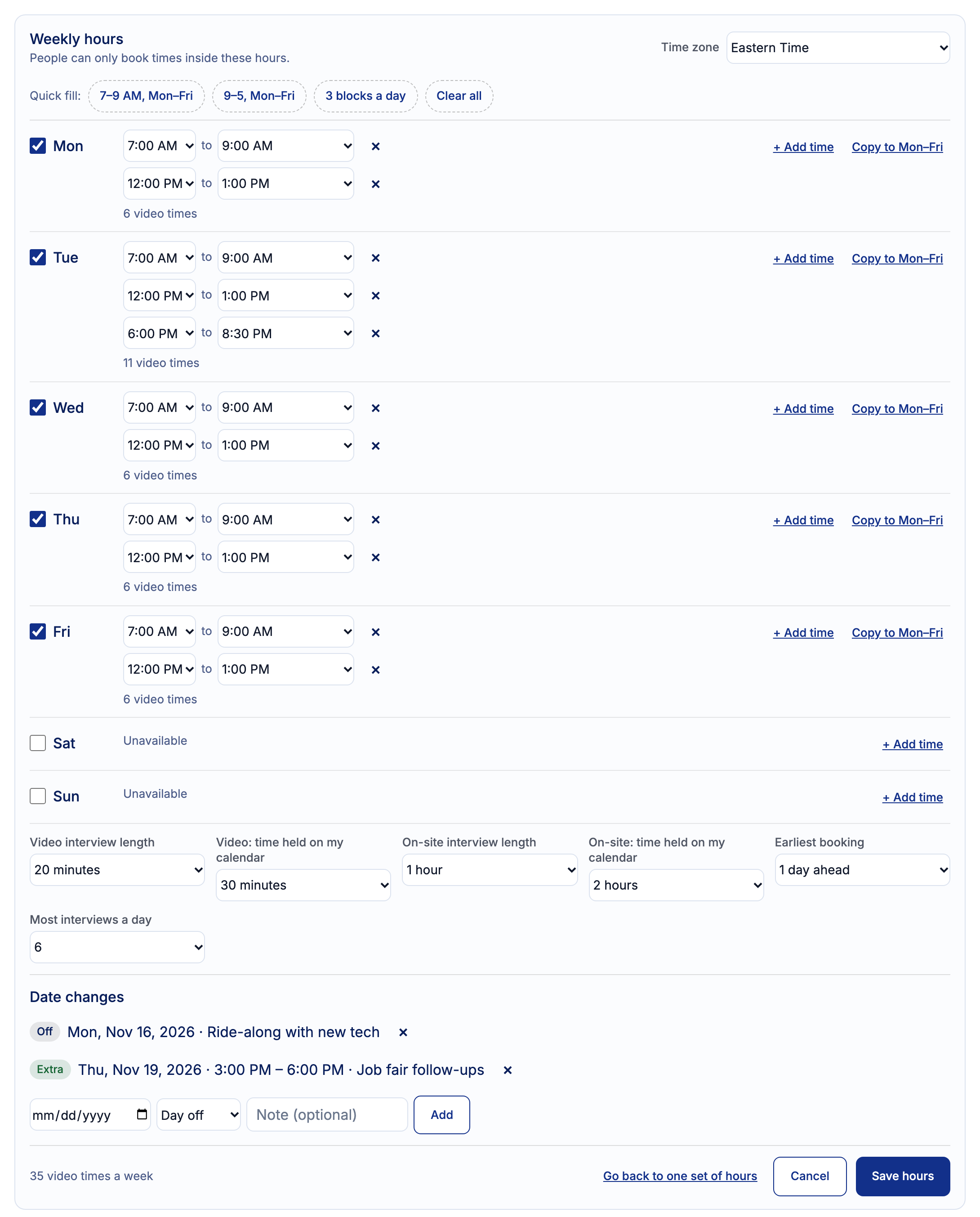
Tell HRGP when you can interview, day by day. Monday might be 7 to 9 AM and 12 to 1 PM, and Tuesday can add an evening. Applicants then choose a time from those hours, in their own time zone, and nothing outside them can be booked.
You also set how long each interview is and how much of your calendar it takes, separately for video and on-site interviews. So a 20-minute video call can hold 30 minutes, and a 1-hour on-site interview can hold 2 hours for travel and a walk-through.

How it works
Open Availability on the Calendar page
Choose Set different hours for each day and pick your time zone.
Add your hours
Give each day one or more blocks of time, or start from a Quick fill. Copy one day to Monday through Friday.
Set lengths and limits
Choose the video and on-site interview length, the time held on your calendar, the earliest booking and the most interviews a day.
Add date changes
Mark a day off, or add extra hours on one date.
Save hours
The Availability line shows your week. Press Edit hours any time to change it.
Send the link
From the applicant's interview step, send the link to pick a time. The applicant books one of your open times.
Different hours for each day
On the Calendar page, under Availability, choose Set different hours for each day. Each day gets one or more blocks of time. Press + Add time for another block, or Copy to Mon–Fri to use one day's hours on every weekday. Quick fill buttons set common patterns in one click, like 7–9 AM Monday to Friday or 9 to 5.
Under each day, HRGP shows how many video interview times those hours give you, and the total for the week. When you save, the Availability line on the Calendar page sums it up, with an Edit hours button to change it.
Interview length and time held
Six settings decide how each interview fits into your hours. Interview times start one time held apart, and the whole time held has to fit inside your hours. The applicant is told the interview length. When your Google or Outlook calendar is connected, the interview event is the interview length, and HRGP adds a private hold right after it, with no guests, for the rest of the time held.
- Video interview length: 15, 20, 30 or 45 minutes, or 1 hour.
- Video time held on your calendar: 20, 30 or 45 minutes, or 1 hour.
- On-site interview length: 30 or 45 minutes, 1 hour or 1½ hours.
- On-site time held on your calendar: 1, 1½, 2 or 3 hours.
- Earliest booking: any time, 12 hours ahead, 1 day ahead or 2 days ahead.
- Most interviews a day: no limit, or a limit of up to 10.
Days off and extra hours
Under Date changes, pick a date and mark it as a day off, like a holiday, or add extra hours on that one date, like an afternoon of interviews after a job fair. Add a note if you like. Your weekly hours stay the same for every other day.
What the applicant sees
From the applicant's video interview step, choose to let the applicant pick a time and press Send link to pick a time. The applicant gets an email with a link. They don't need an account. They pick a date, see the open times in their own time zone with the interview length at the top, and tap one. They see Booking Confirmed! and the interview goes on your calendar.
Times already busy on your calendar, and times taken by other HRGP interviews, are left out. HRGP checks the time again when the applicant books, so a time outside your hours can't be booked even by changing the page.
Why it helps
- Interviews land only in the hours you can really give them, around service calls and crew work.
- No back-and-forth emails to find a time.
- Short video calls and longer on-site visits each get the time they need.
- Your calendar keeps a buffer after each interview, without the applicant seeing a longer meeting.
- Days off and one-time extra hours don't mean changing your whole week.
- Applicants book from a phone in a minute, in their own time zone.
Interview availability questions
Can an applicant book outside my hours?
No. HRGP checks the time when the applicant books and accepts only a time it offered from your hours.
What is time held?
How much of your calendar one interview takes. A 20-minute video interview with 30 minutes held starts every 30 minutes and leaves you 10 minutes after each call.
Does it work with Google Calendar and Outlook?
Yes. Times already busy on your connected calendar are not offered. The interview event goes on your calendar at the interview length, with a private hold after it for the rest of the time held.
Can I go back to one set of hours?
Yes. Go back to one set of hours in the weekly hours screen returns you to a single start and end time for every day.
Does each person set their own hours?
Yes. Each person sets their own hours on their own Calendar page.
Does it cost extra?
No. It's part of the $99 plan.
Related
Let applicants book the times you can really interview
Part of HRGP, the HRIS for small business. $99 a month. No per-seat fees. 14-day free trial.