

Payroll preparation
Everything your payroll company needs, ready to send
HRGP keeps your hours, time off and new-hire details, then prepares the file your payroll company needs. Included through June 30, 2027.
HRGP prepares the file; your payroll company runs payroll and files taxes. Available to businesses in the United States.
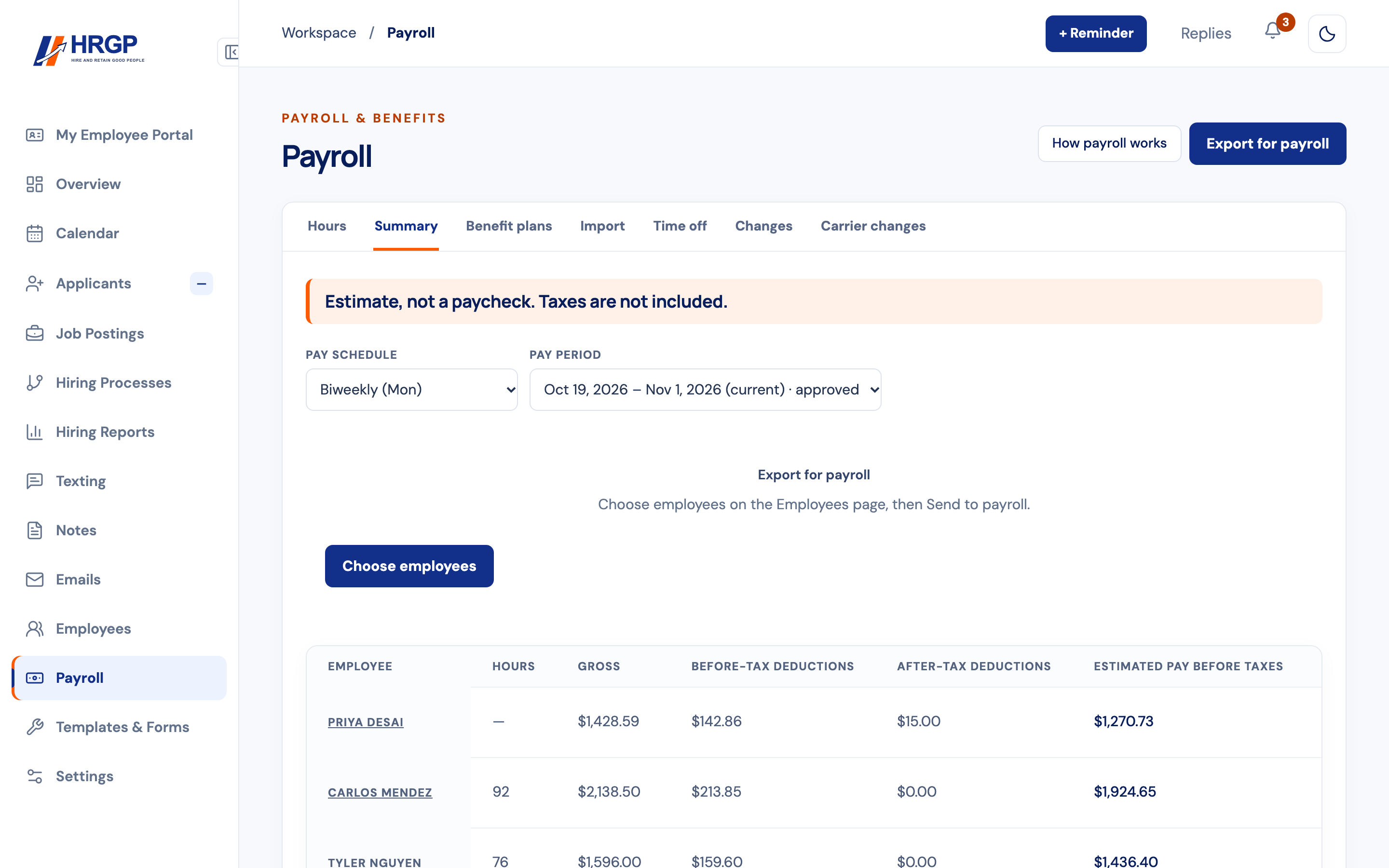
How the payroll file works
Type it once
New-hire details, hours and time off collected in HRGP go into the file or entry sheet for your payroll company, so nobody asks for them twice.
Check before you send
See each employee's estimated pay in the Summary, labelled as an estimate and not a paycheck, so you catch mistakes before payroll runs.
Send to payroll
Send to payroll prepares a file or entry sheet for Gusto, BambooHR, ADP, Paychex Flex, Paycom or QuickBooks Payroll, plus a general file for other payroll companies.
Your payroll company runs payroll
Keep your payroll company. They run payroll and file taxes, as they do today.
What a pay period looks like
- Enter hours on the Hours tab for each person: regular, overtime, paid time off, holiday and sick. Salaried employees can skip this, since their hours are optional and only for your records. The Import tab brings hours in from a file.
- Approve the period when the hours are right.
- Check the Summary tab: gross, before-tax deductions, after-tax deductions, estimated pay before taxes, and the company's benefit cost, for each person. It's clearly marked as an estimate, not a paycheck.
- Choose Export for payroll, or tick the people you want on the Employees page and choose Send to payroll.
What else is on the Payroll page
Benefit plans and Time off live next to the hours, so an approved plan or time-off request is already there when the period closes. The Changes tab lists what changed for each person, and Carrier changes does the same for your benefit carriers.
The Reports tab has reports like Payroll Readiness, Estimated Gross Pay and Hours by Employee, with CSV and PDF downloads.
One way only
HRGP sends the information to your payroll processor. It never moves money, and nothing comes back from the processor. The processor's figures are the official ones.
Works with your payroll company
- Gusto, BambooHR, ADP, Paychex Flex, Paycom or QuickBooks Payroll, plus a general file for other payroll companies. HRGP prepares it for them each pay period.
- Employees request time off in My Employee Portal, and time off is part of the file HRGP prepares for payroll.
- Included in your plan through June 30, 2027. We'll tell you the price before anything changes.
Payroll questions
Does HRGP do payroll?
HRGP keeps hours, time off, pay details and benefit plans, shows each employee's estimated pay, and prepares the file for your payroll company (Gusto, ADP, Paychex, QuickBooks Payroll and others). Your payroll company runs payroll and files taxes. It's included in the $99 plan through June 30, 2027.
Which payroll companies are supported?
Gusto, BambooHR, ADP, Paychex Flex, Paycom or QuickBooks Payroll, plus a general file for other payroll companies.
Do I have to change payroll companies?
No. Keep your payroll company; HRGP prepares the file for them each pay period.
Does HRGP pay my employees?
No. HRGP never moves money. Your payroll company pays your people and files the taxes.
Can I send only some employees?
Yes. Tick the people on the Employees page and choose Send to payroll, or send one person from their own page.
Related
Stop retyping hours into payroll
Part of HRGP, the HRIS for small business. $99 a month. No per-seat fees. 14-day free trial.