

Keep
See how your team works together
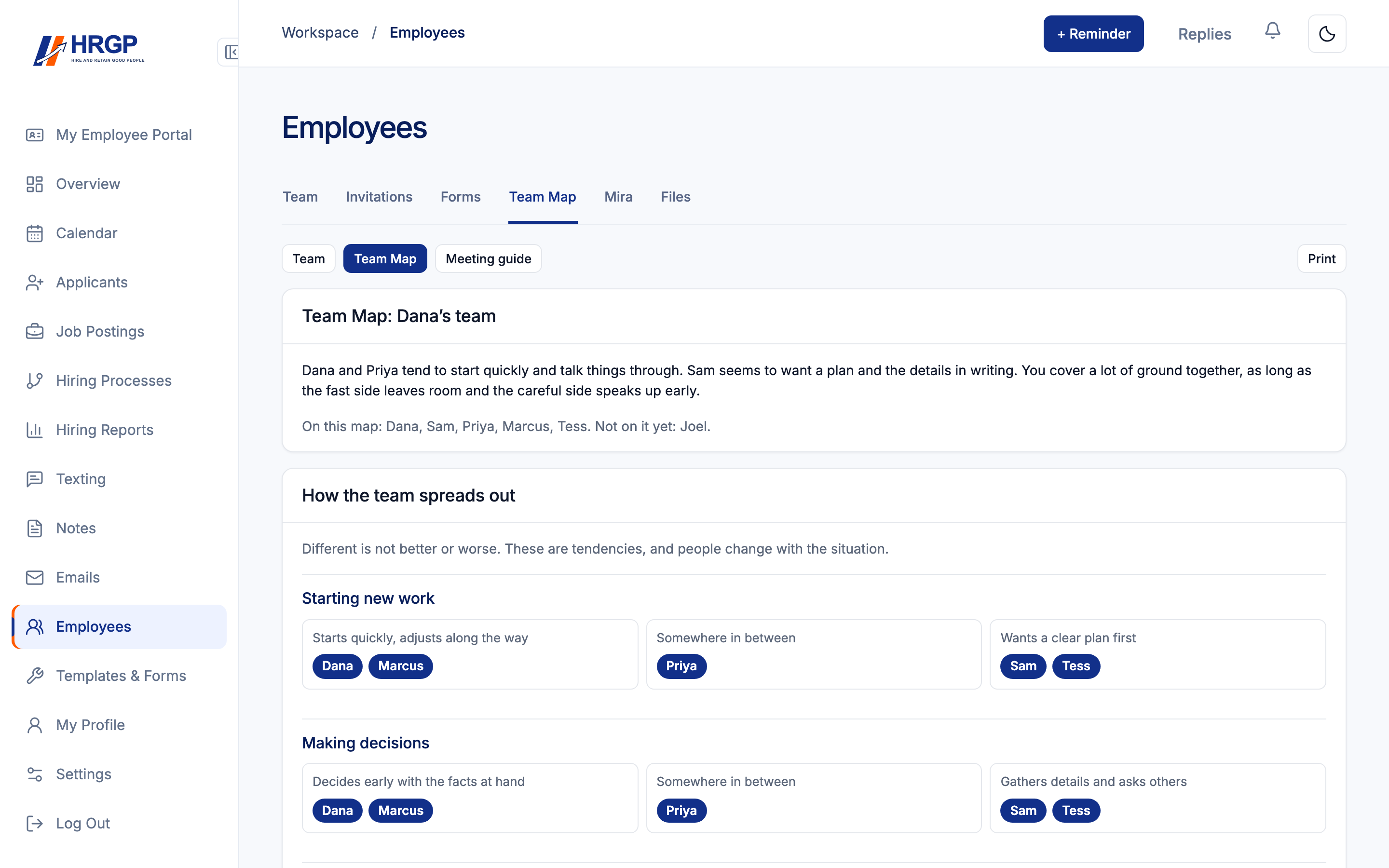
Team Map is a short report on how a team works together, based on the Mira Personality Profiles of the people who agree to join. Everyone on the map sees the whole map.

Watch: Team Working Styles Report and Meeting Guide
A short walk-through with sample data. Watch on YouTube
See it work with your own team. 14-day free trial, no credit card needed.
Start Free TrialHow Team Map works
Ask the team
Each person gets a to-do on My Employee Portal and says yes or no. A map needs at least 3 people.
Run the map
Anyone who hasn't joined is left out. It takes a minute or two.
Meet for 45 minutes
A guide walks the team through it. You write your own agreements.
What the map shows
The map opens with a few plain sentences about the team, then lists who is on it and who has not joined yet. Under How the team spreads out, each topic has three boxes, such as starts quickly and adjusts along the way, somewhere in between, or wants a clear plan first. Each person's name sits in a box. Topics include starting new work and making decisions.
The screen says it plainly: different is not better or worse. These are tendencies, and people change with the situation. A section called Where styles may rub points to the spots most likely to cause friction, and each person can read the map and mark their own line.
The 45-minute meeting
The report is the starting point. The meeting is where it becomes useful, so HRGP gives you the agenda:
- 5 minutes: why we are doing this. The manager says it has nothing to do with anyone's pay or job.
- 10 minutes: each person on their own line. The manager goes first, and each person says what sounds right and what doesn't.
- 15 minutes: where we rub. Pick one spot and ask when it last happened and what would have made it easier.
- 10 minutes: write our agreements.
- 5 minutes: who does what. Name who owns each agreement, and confirm the 60-day look back.
Agreements you can keep
The team writes short agreements on how it shares news and changes, how it makes decisions, how it gives feedback, and what it does on a hard day. HRGP reminds the manager to look back at 60 days and see which ones are working. The map and guide can also be printed.
Team Map lives under Employees in HRGP, next to the rest of your people records, and it uses Mira Personality Profiles you already have. A manager sees their own team. An admin who is not on the team doesn't see the map.
What it leaves out
- It never shows scores, personality types or anyone's full Mira report.
- Joining is up to each person.
- It's for working better together, not for pay, promotion or firing decisions.
Team Map questions
How many people can be on a map?
From 3 to 12, counting the manager.
Do people have to join?
No. Anyone who says no is left out, and the manager just sees that they haven't joined.
Is it included?
Yes. It's included in the $99 plan.
Can someone disagree with the map?
Yes. Nobody has to share more than they want to, and it's fine to disagree with the map. It's a starting point, and it can be wrong.
Can the company's admin read our map?
Not unless they are on the team. A manager sees their own team's map, and everyone on the map sees the whole map.
What happens after the meeting?
HRGP reminds the manager to look back at 60 days at which agreements are working.
Related
Give your team a better way to talk about how it works
Part of HRGP, the HRIS for small business. $99 a month. No per-seat fees. 14-day free trial.