

Keep
Hear about problems while you can still fix them
HRGP checks in with each new hire and their manager at day 7, 30, 60 and 90, on its own.

Watch: New Hire Check-Ins: 30, 60 and 90 Days
A short walk-through with sample data. Watch on YouTube
See it work with your own team. 14-day free trial, no credit card needed.
Start Free TrialHow First 90 Days works
Check-ins go out on their own
Counted from the start date. A date that falls on a weekend moves to Monday.
The new hire and manager answer
A few short questions, by a link in their email.
Low answers raise a flag
Overview shows who needs a conversation, with a follow-up due within 2 working days.
See what is working
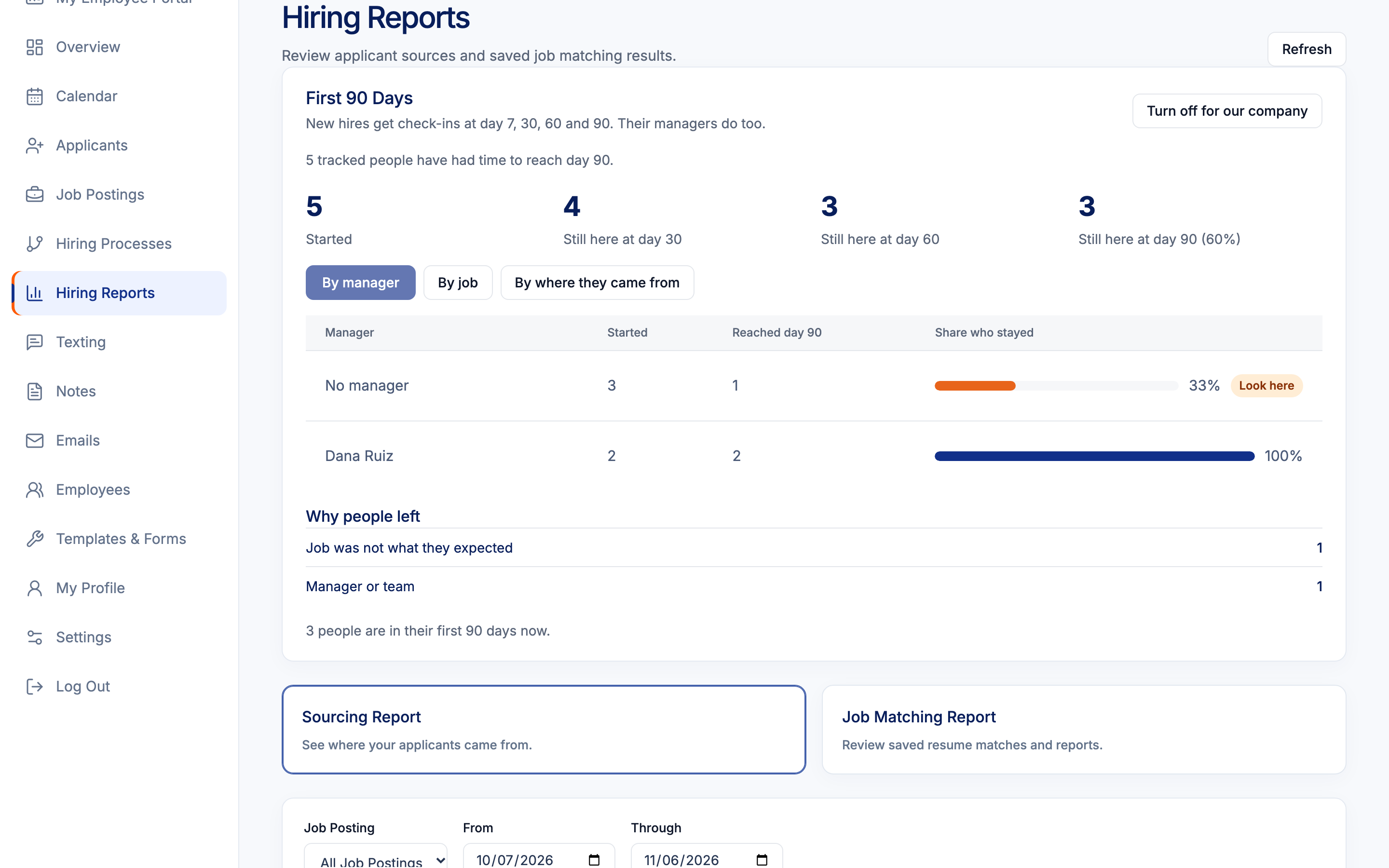
A report under Hiring Reports shows how many new hires stayed to day 90, by manager, job and where they came from.
What a new hire is asked
A check-in is short and works on a phone. Each question has three answers to tap:
- Does the job match what you were told?
- Do you have what you need to do it well?
- Is your manager giving you enough help?
- Do you feel like part of the team?
- Do you see yourself here a year from now?
- What is one thing we could fix? They can type an answer here.
When an answer needs attention
The screen tells new hires that their answers go to their manager and the company's HR admin, and that their name stays on them. If they tick the box to keep the answers from their manager, only the admin sees them.
Low answers put a person on the Overview card and on a to-do in My Employee Portal, and the manager gets an email, unless the answers were kept from them. The message gives a date: talk with this person within 2 working days. If nobody answers a check-in, HRGP sends one reminder after 3 days. Check-ins go by email. They are not sent by text.
The report
Under Hiring Reports, the First 90 Days report shows how many people started, how many were still here at day 30, day 60 and day 90, and the share who stayed. You can switch between manager, job and where they came from, and a Look here label marks a low number. A short list shows why people left.
This is where the HRIS angle pays off. The start date comes from the employee's record, where they came from comes from their application, and the reason for leaving comes from the person who ended the job. You don't have to set up anything separately to connect hiring to who stays.
An admin can choose Turn off for our company on the report if you don't want the check-ins.
Built to get honest answers
- A new hire can keep a check-in's answers from their manager, so only an admin sees them.
- HRGP never calls the answers anonymous, because they aren't.
- When someone leaves in their first 90 days, HRGP asks the person ending the job for the main reason.
First 90 Days questions
Do I have to send anything?
No. Check-ins go out on their own, based on the start date.
Does AI score my employees?
No. People answer the questions and people read the answers.
Is it included?
Yes. It's included in the $99 plan.
Can a new hire keep answers from their manager?
Yes. There is a box to keep a check-in's answers from their manager. Only the HR admin then sees them, and their name stays on them.
How are check-ins sent?
By email, with a link. One reminder goes out after 3 days. They are not sent by text.
Can we turn it off?
Yes. An admin can choose Turn off for our company on the report.
Related
Keep the good people you hire
Part of HRGP, the HRIS for small business. $99 a month. No per-seat fees. 14-day free trial.