

Offboard
When someone leaves, nothing gets missed
Terminate opens a short leaving panel, so you record what happened, get a checklist and end access at the right time.

Watch: Employee Offboarding Checklist and Exit Interviews
A short walk-through with sample data. Watch on YouTube
See it work with your own team. 14-day free trial, no credit card needed.
Start Free TrialHow offboarding works
Record the leaving
Enter the last day, whether they quit or were let go, the reason and whether you'd rehire them.
Work the checklist
Access, equipment, final pay and benefits, each with an owner and a reminder. Change the list in Settings.
Send an exit interview
They answer by a link that needs no sign-in, and answers go to your HR admins.
End access at the right time
At the end of the last day or right now. You choose.
The Leaving list
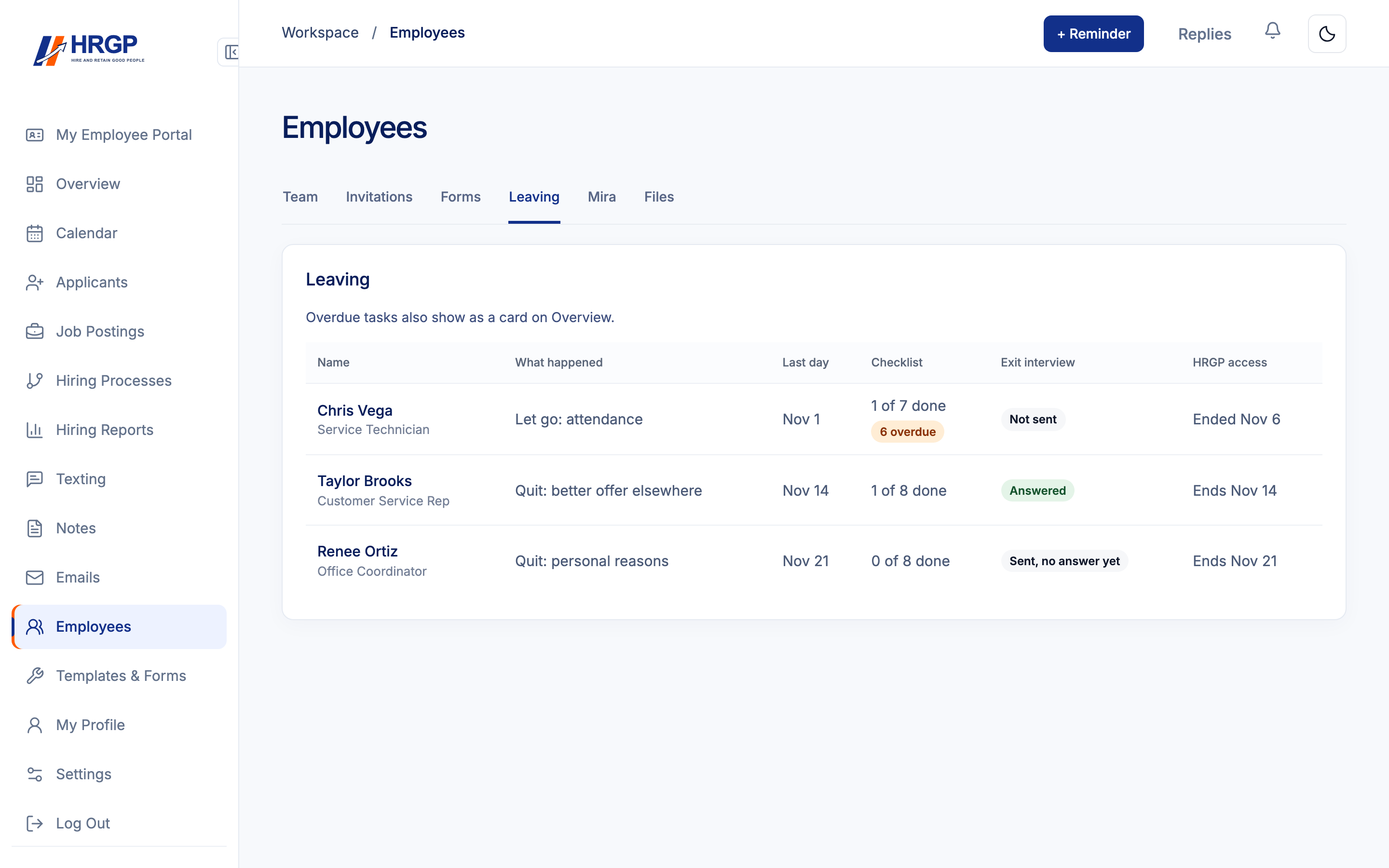
The Leaving tab under Employees shows everyone on their way out in one table: their name and job, what happened, their last day, how much of the checklist is done, where the exit interview stands, and when their HRGP access ends. Overdue tasks are marked there and also show as a card on Overview, so nothing depends on someone's memory.
Each task has an owner and one reminder the day before it is due. You change the list in Settings, under Leaving checklist.
What the exit interview asks
The exit interview opens on a phone from a link, and the person can skip any question. It says who will read the answers. It asks:
- What is the main reason you are leaving?
- Did the job match what you were told?
- Did you get the training you needed?
- Did your manager treat you fairly?
- Was your pay fair for the work?
- Would you recommend working here to a friend?
What the Turnover report tells you
A single departure is a story. Several are a pattern. The Turnover report counts the people who left, how many quit and how many were let go, how many left in their first 90 days, how many exit interviews were answered, and how many would recommend working here. It then breaks down why people left and where it is happening, by reason, manager and job.
Since HRGP is your HRIS, the employee's record stays with you after they go. The Employees status filter still lists former people, and you can see the same record your team used while they worked for you.
What HRGP does not do
HRGP reminds you about final pay and benefits, but your payroll company pays the final wages, and rules on final pay vary by state. Check with your own adviser when you aren't sure.
See the bigger picture
- The Leaving tab under Employees shows everyone on their way out.
- A Turnover report shows why people leave, by reason, manager and job.
- HRGP reminds you about each item but doesn't give legal advice or handle final pay.
Offboarding questions
Who sees exit interview answers?
Your HR admins. The manager doesn't see them unless that manager is also an admin.
Does HRGP pay final wages?
No. HRGP reminds you. Your payroll company pays people.
Is it included?
Yes. It's included in the $99 plan.
Can I change the exit interview questions?
Yes. In Settings, under Leaving checklist, you can change the wording or turn a question on or off.
Does the person have to answer every question?
No. They can skip any question.
Can I end access right away?
Yes. You choose the end of the last day or right now.
Related
Handle every goodbye the same careful way
Part of HRGP, the HRIS for small business. $99 a month. No per-seat fees. 14-day free trial.